
Dual Print Layouts (Thermal & A4)
Effortlessly toggle between 58mm/80mm thermal POS slips for retail or standard A4/Letter size documents for formal office contracts.
Create professional business receipts online. Add your business and customer details, enter products or services, review totals, and print or download receipts using supported export options.
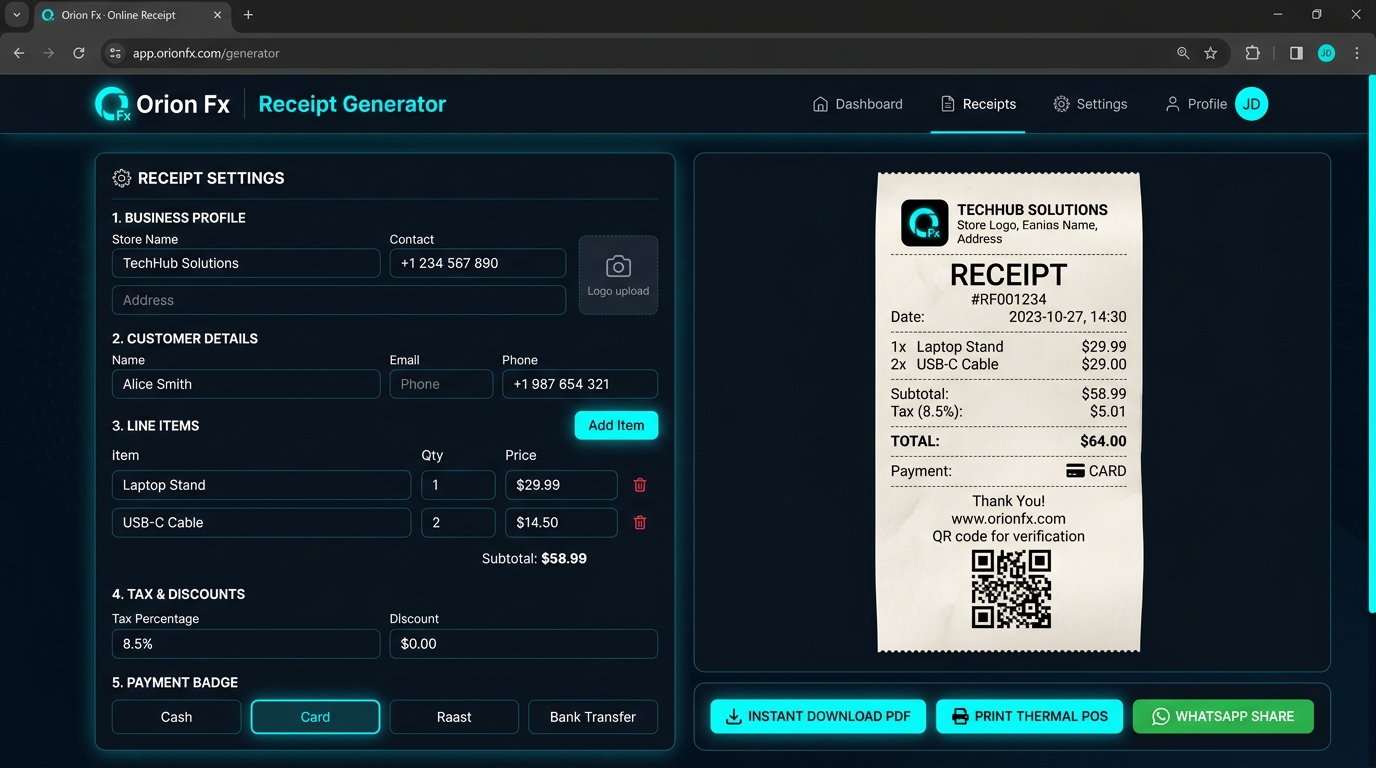
Whether running a retail counter, mobile repair desk, café, or freelance consulting business, professional customer receipts are essential for trust, record-keeping, and legal compliance.
Standard office printers waste costly A4 paper and time for everyday point-of-sale transactions. Orion Fx Receipt Generator includes native CSS print drivers built specifically for 58mm and 80mm thermal receipt printers.
Most online document creators require account registration, collect your customer contact details, or add intrusive watermarks unless you pay. Orion Fx believes your commercial data belongs solely to you.
Everything you need to create, brand, calculate, and distribute verified sales receipts.
Effortlessly toggle between 58mm/80mm thermal POS slips for retail or standard A4/Letter size documents for formal office contracts.
Export pixel-perfect PDF documents and high-resolution JPG images with one click for easy filing, emailing, or client printing.
Add unlimited line items with itemized quantities, unit rates, sales tax percentages, GST, and flat or percentage discount formulas.
Generate a polite, pre-formatted transaction message with key amounts and receipt links ready to dispatch straight to your customer's WhatsApp.
Automatically generates a scannable QR code on the receipt footer containing receipt ID, timestamp, and verification link.
Complete support for Pak Rs. (Rs. / PKR), US Dollar ($), Euro (€), British Pound (£), UAE Dirham (AED), and Saudi Riyal (SAR).
Personalize receipts with your store logo, business tagline, custom return policy terms, and polite customer thank-you notes.
Clearly designate whether payment was settled via Cash, Credit/Debit Card, Direct Bank Wire, Raast, EasyPaisa, or UPI.
Follow these straightforward steps to generate, customize, and print your customer receipt in under a minute.
Type in your store or trading name, company address, contact phone, and tax/NTN ID. You can also upload your brand logo for an authentic retail appearance.
Input your customer's name, email, or WhatsApp number. Set your unique receipt number (e.g. #RF-2026-104) and transaction date to keep bookkeeping organized.
Add line items with descriptions, quantities, and unit prices. Click "+ Add Line" to include as many merchandise items or service fees as needed. Totals tally automatically.
Apply regional sales tax or promotional discount amounts. Select whether the transaction was tendered in Cash, Card, Raast, or Bank Transfer.
Review the live preview on screen. Click "Print Thermal POS" to feed directly into your 58mm/80mm receipt printer, or hit "Instant Download PDF" for digital record storage.
Engineered for diverse small business setups, retail establishments, and service contractors.
Quickly print sales slips for customer purchases on 58mm or 80mm counter thermal receipt rolls with return policy clauses.
Issue repair intake slips and collection payment receipts with device serial codes, warranty terms, and advance deposits.
Generate kitchen order tokens and customer bill receipts with itemized order quantities, table numbers, and tip calculations.
Send instant payment confirmation receipts to international and domestic clients following project milestones or retainer settlements.
Common questions about printing receipts, privacy, thermal printers, and supported export formats.
Yes. You can generate unlimited receipts without paying any subscription fees or needing to register an account. There are no trial periods and no watermarks on your exported PDF documents.
Yes. The application has dedicated CSS @media print rules calibrated for standard 58mm and 80mm thermal receipt printers. When you click print, the system automatically formats the ticket for ESC/POS receipt paper without extra margins.
Yes, 100%. All processing and rendering takes place client-side within your browser. Your customer details, pricing, and business logo are never transmitted to our servers or saved in a remote database.
Click the "WhatsApp Share" button inside the tool. It formats the receipt ID, total balance, payment status, and verification URL into an orderly message and opens WhatsApp Web or your mobile WhatsApp application ready to send.
Yes. You can upload any PNG, JPG, or SVG store logo. You can also customize the footer notes to specify your business warranty terms, return policies, or social media links.
For detailed client invoices with 6 designer templates, multi-currency conversion, and overdue tracking, explore our companion tool InvoiceCraft – Online Invoice Generator.
Open the free web application now and create clean, professional, printable sales slips in seconds.